What students learn
1. Reach is not action
Boosted posts buy the most reach per pound but bring few people through the door. Pop-up stalls reach few people, but one in five comes along. Points reward both, so students meet the gap between caring and doing.
2. Diminishing returns
Every channel follows a response curve: the first £100 on a channel buys far more than the fifth. Spreading the budget usually beats going all in.
3. Say it, prove it
"Carbon-neutral repairs!" wins 10% more reach, then costs 20 trust points when the local paper checks green claims. The specific, logged claim earns trust and free coverage. A direct route into the CMA Green Claims Code.
4. Control means adapting
Month 2 rains every Saturday. Teams that move money from in-person channels to online and partner channels lose less. A concrete example of the Control stage in SOSTAC.
Good for digital marketing, marketing communications, sustainability marketing and charity marketing classes. In class you need one screen and paper; students do not need devices. In solo mode, each student plays on a phone or laptop.
Second Turn Repair Café, its city and every twist are fictional. The numbers come from a simplified teaching model, not real campaign data. Treat them as prompts for discussion, not benchmarks.
Five golden rules
- Launching a month cannot be undone.Once you press Launch, that month's points are banked. Read each team's plan back before you press it.
- Budgets carry over, unspent money does not.Each team's spend from last month stays on its card as a starting point. Any money left unspent is lost, and the results say so.
- The timer never moves the game on.Press Start timer. At 0:00 the clock turns pink and waits for you.
- "Restart game" needs two clicks within 3 seconds.One accidental click does nothing.
- The game remembers its place in this browser.A reload keeps the current game. To start fresh, use Restart game. Once loaded, it runs without Wi-Fi.
The scoring model
The five channels
| Channel | Type | Reach ceiling | Curve (k) | Visit rate | Minimum |
|---|---|---|---|---|---|
| Boosted social posts | Paid | 5,000 | £180 | 1.0% | none |
| Local paper and radio ad | Paid | 4,000 | £300 | 1.2% | £250 |
| Posters and flyers | Owned | 1,600 | £120 | 3.0% | none |
| Pop-up repair stall at the market | Owned | 450 | £120 | 20% | £100 |
| Partner and creator outreach | Earned | 2,200 | £150 | 2.5% | none |
Visitors = reach × visit rate × (trust ÷ 50)
Spend below a channel's minimum buys nothing
Trust starts at 50 and stays between 0 and 100
Points each month = reach ÷ 100 + visitors + (trust − 50)
*A concave response curve: each extra £50 on a channel buys less than the one before. Real advertising response curves can also be S-shaped (Vakratsas et al., 2004); the simple version keeps the maths visible for students.
Themes and claims
- Before and after: boosted posts reach 25% more people.
- Money saved: flyers and the pop-up stall bring 30% more visitors.
- People: partner outreach reaches 30% more people, and trust rises by 3.
- "312 items fixed last year, every one logged" (specific and evidenced): trust +4.
- "Carbon-neutral repairs!" (an absolute claim with no evidence): reach +10% every month it is used, then −20 trust in month 3 if it was used in any month.
- "Eco-friendly fixing for a greener planet" (vague): trust −3.
Other trust effects
- Pop-up stall: +1 trust for every 10% of the monthly budget spent on it, up to +5.
- Local paper at £250 or more: +2.
- 70% or more of the budget on boosted posts annoys people: −3 (−8 in month 2).
The three twists
| Month | Brief students see | Twist revealed after launch |
|---|---|---|
| 1 | Spring launch: students and young families on tight budgets. | A money-saving creator shares the posts: teams on Before and after get +40% social reach. |
| 2 | Wet October: mixed forecast, followers have seen the ads. | Rain every Saturday: pop-up reach −40% and its visit rate −60%; flyer visits halve; heavy boosting costs 8 trust. |
| 3 | Climate Week: groups and the paper want green stories. | Partner reach +50%. A specific claim this month earns +2,000 reach and +8 trust, unless "carbon-neutral" was used in any month, which costs 20 trust instead. |
Results you can predict
Three strategies played on £500 a month. These are the three rival agencies in solo mode, so the numbers are the same every time.
| Strategy | Month 1 | Month 2 | Month 3 | Final trust | Total points |
|---|---|---|---|---|---|
| Steady Stitch: spreads the budget, moves online in the rain, partners in Climate Week, specific claim | 243 | 194 | 382 | 80 | 819 |
| Front Page Co.: 60% paper, 40% social, People theme, specific claim | 143 | 164 | 223 | 85 | 530 |
| Boost & Hope: everything on boosted posts, Before and after, "carbon-neutral" | 172 | 103 | 51 | 16 | 326 |
Boost & Hope has the highest total reach of the three (about 21,900) and the lowest score. You can use this table as a paper version if the technology fails.
"We spent £200 on the paper and got nothing"
The paper's minimum booking is £250. Below it the money is wasted. With a £300 budget, the paper takes most of it: a good prompt on what a small charity can afford.
"We had the most reach and lost"
Reach scores 1 point per 100 people; each visitor scores 1 point. Ask: which goal matters more to a repair café, being seen or being visited?
Why trust multiplies visitors
Visitors are scaled by trust ÷ 50, so a team on trust 25 gets half the visitors from the same spend. Trust links the perception goal to the action goal.
Changing budgets
On £300, spreading into five channels leaves the pop-up and paper below their minimums. On £1,000, the curves flatten and balance matters even more.
Before the lesson
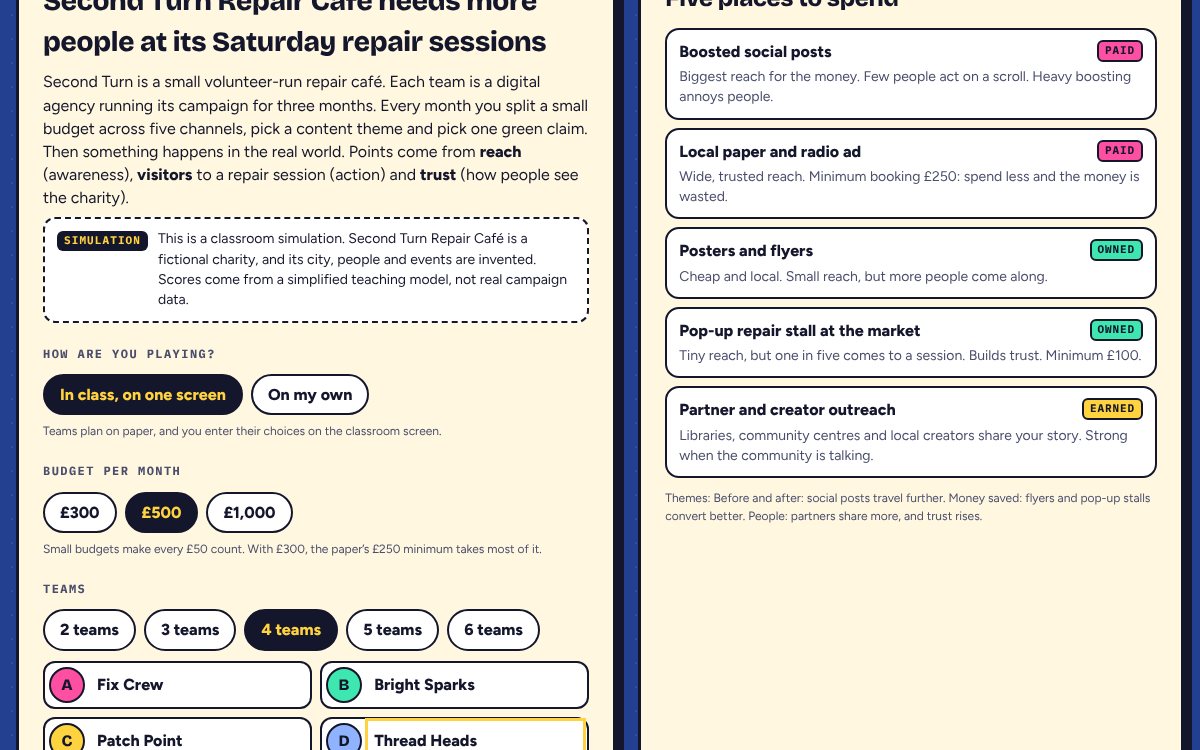
- Open lab.yingwu.co.uk/shoestring-campaign/ on the classroom computer and choose In class, on one screen.
- Pick the budget. £500 is a good default; £300 makes the minimum bookings bite.
- Pick the number of teams and type their names.
- Press Full screen. Zoom with Ctrl + + (Mac: Cmd + +) if the back row cannot read it.
- Show the channel guide on the setup screen, or give each team a copy, so teams can plan on paper.
- Give each team paper for its plan: five channel amounts, one theme and one claim.
Step by step
About 15 minutes in total.
0 Set up the client and form teams
2 min- Say
- "You're a digital agency. Your client is a small repair café with a tiny budget, and it wants more people at its Saturday sessions. Each month you split the budget, pick a theme and pick one green claim. Points come from reach, visitors and trust."
- Students
- Form teams and pick a runner who reads out the plan.
- Note
- Tell students it is a simulation: the café is fictional, and the numbers come from a simplified model.
1 Month 1: Spring launch
3 min · timer 2:00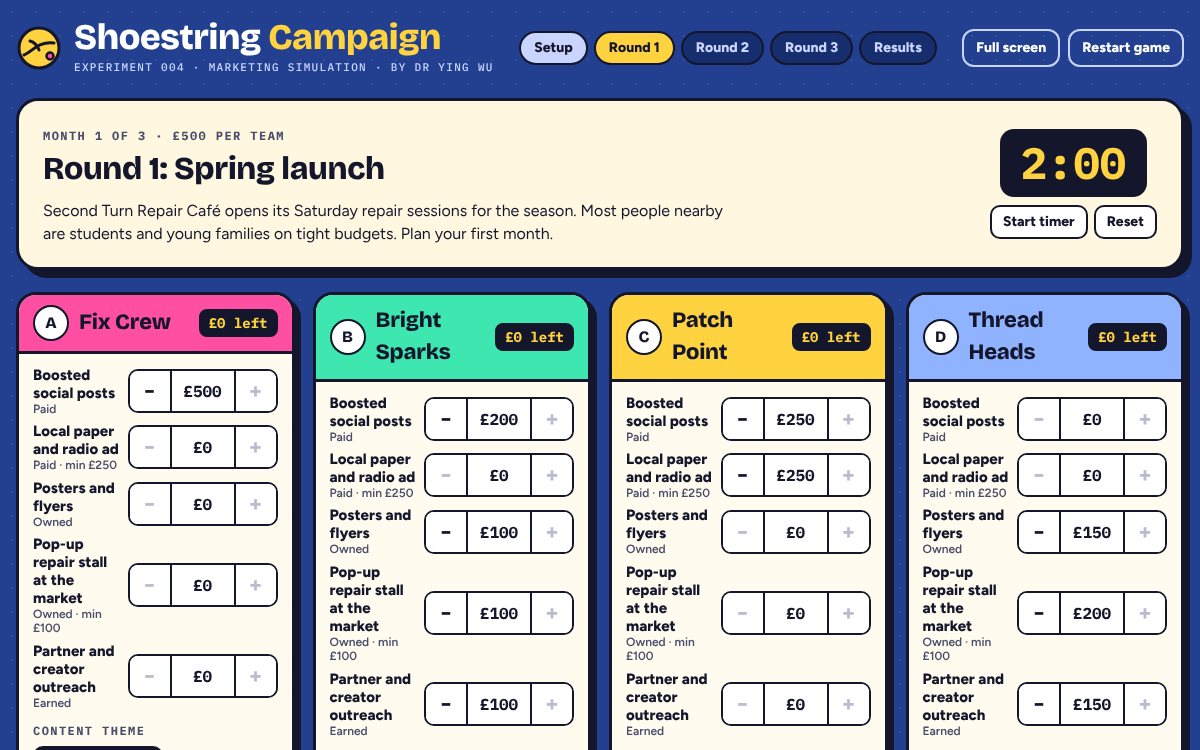
Every team card starts at £0. Enter each team's plan with the − and + buttons (£50 steps). - Click
- Read the brief aloud and press Start timer.
- When time is up, each runner reads out their plan. Click + and − to enter it. Each card shows the money left.
- Click each team's theme and claim.
- Read the plans back, then press Launch campaigns.
- Watch for
- An amount turns pink when it is below that channel's minimum. Point it out before launching, or leave it as a lesson.
2 The reveal
2 min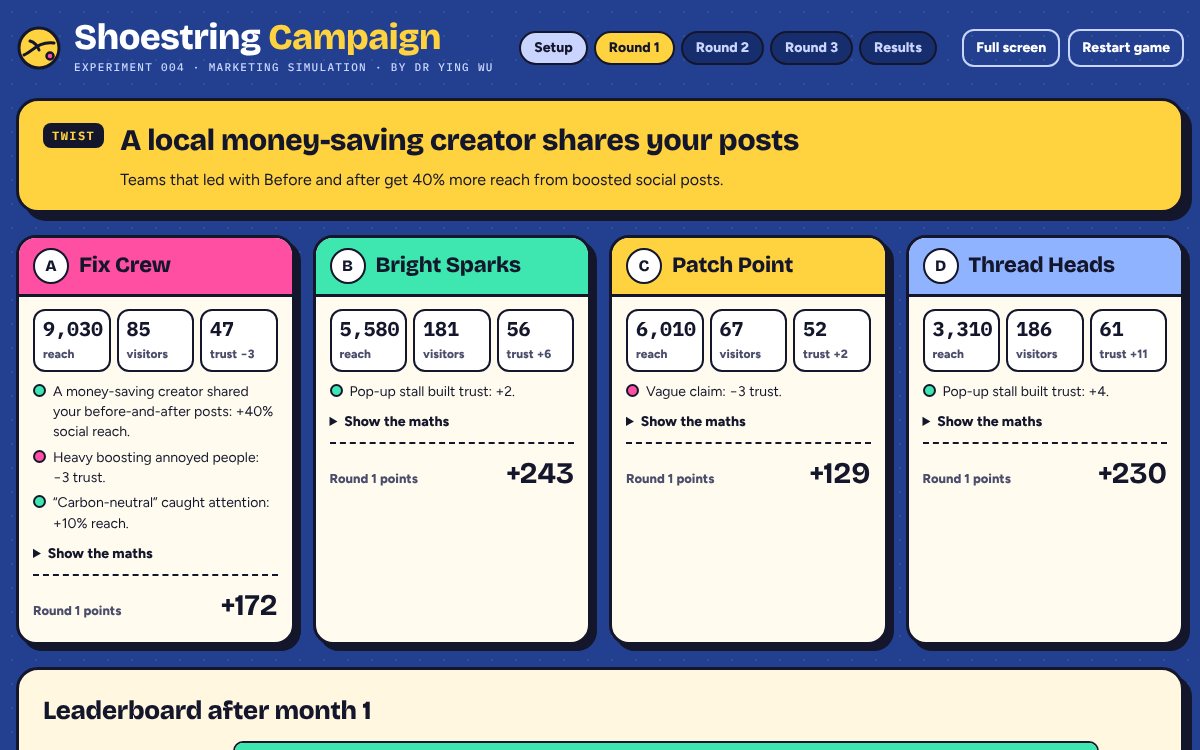
The twist comes first, then each team's reach, visitors, trust and points with a note on why. - Screen
- The twist, one card per team with short notes on what helped and what hurt, and a leaderboard. Show the maths opens each channel's spend, reach and visits.
- Say
- "Who reached the most people? Who brought the most people through the door? Are they the same team?"
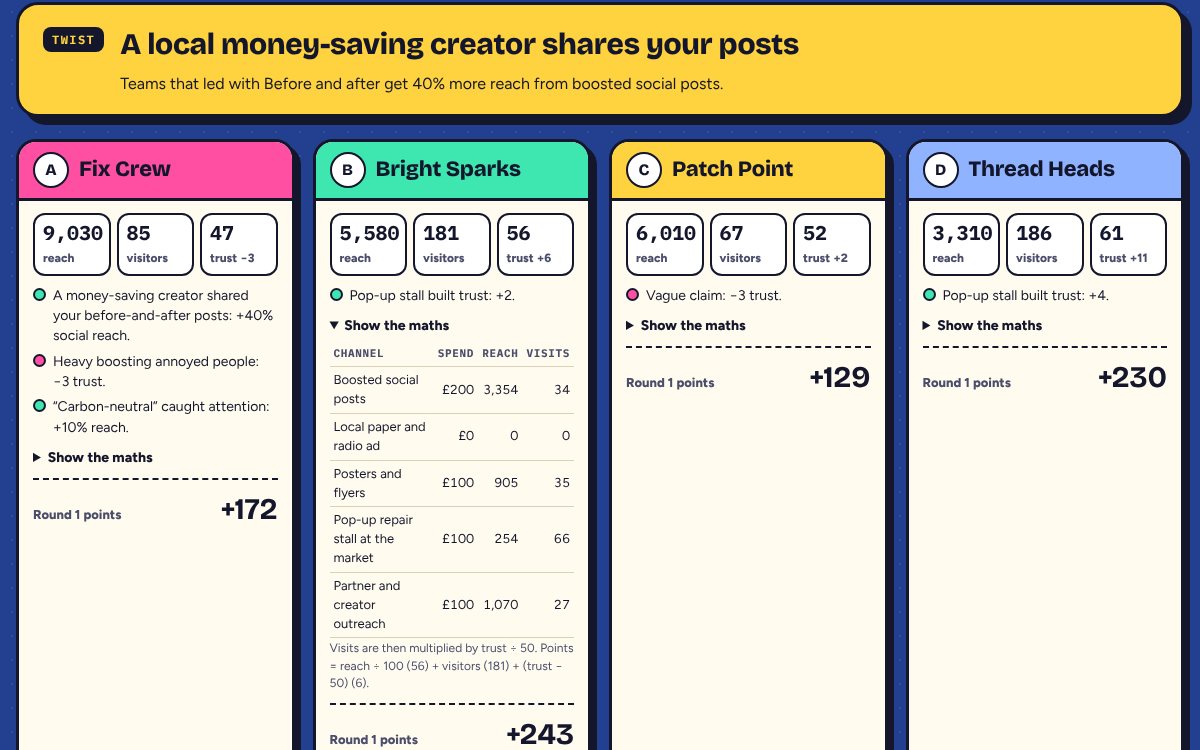
Show the maths lets students check every number. 3 Month 2: Wet October
3 min · timer 2:00- Click
- Press Plan month 2, then Start timer. Last month's amounts stay on each card: change only what teams change. Launch.
- Say
- "The forecast is mixed and your followers have seen your ads. Keep your plan, or change it?"
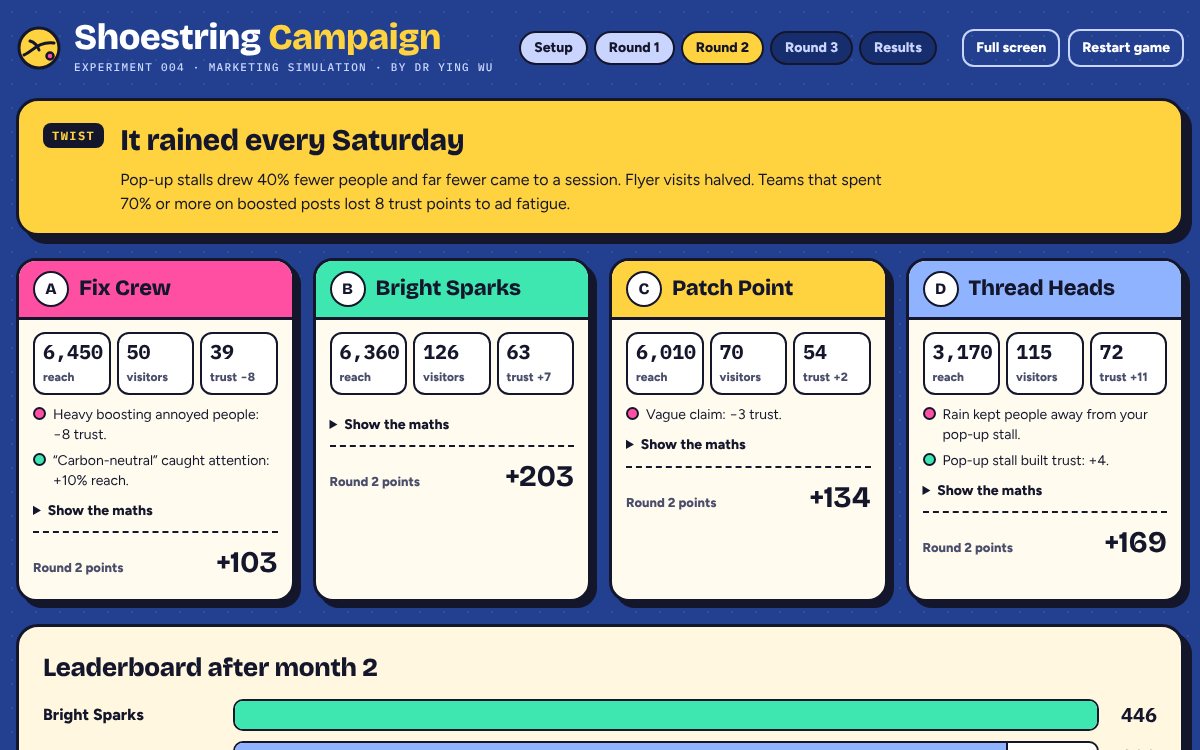
The rain twist rewards teams that moved money online or to partners. 4 Month 3: Climate Week
3 min · timer 2:00- Click
- Press Plan month 3, Start timer, enter changes, Launch.
- Say
- "The local paper is looking for green stories this week. Which claim will you put on every post?"
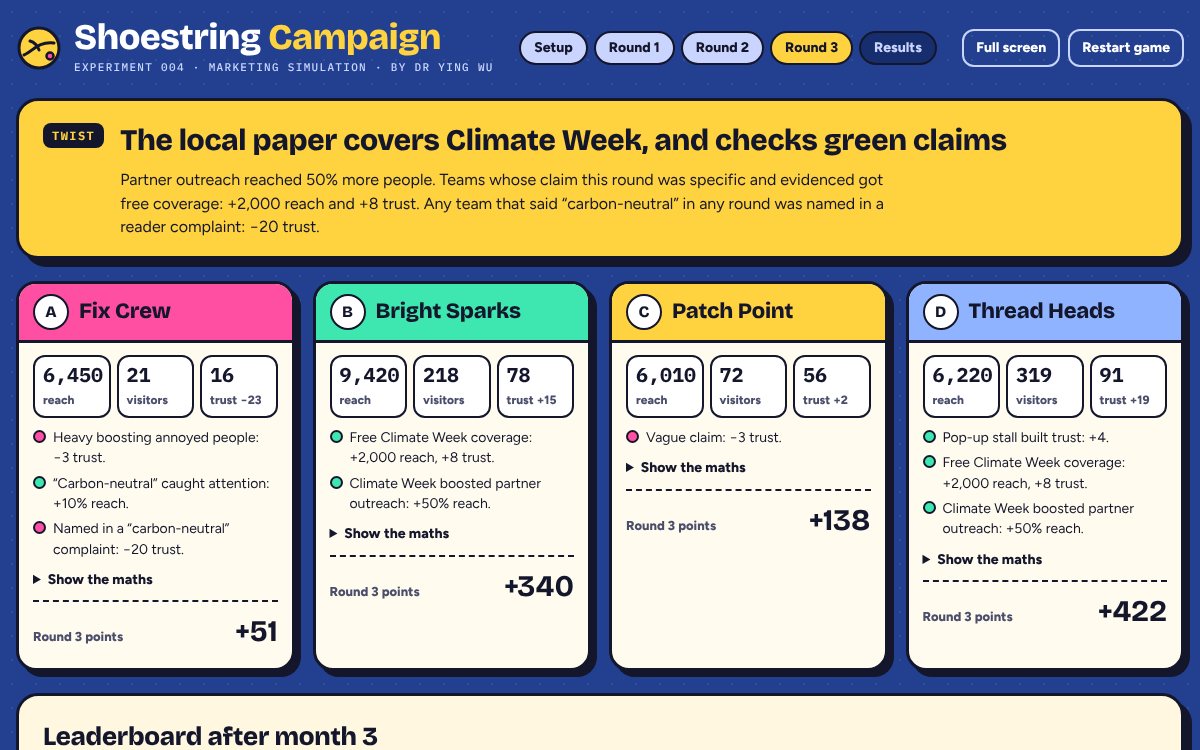
Any team that used "carbon-neutral" in any month loses 20 trust here. 5 Final results and debrief
2 min- Click
- Press See the final results: a podium, a month-by-month scoreboard, five debrief questions and a simulation note.
- Say
- Pick one: "Which channel bought you the most visitors per £50?" or "What did 'carbon-neutral' win you, and what did it cost?"
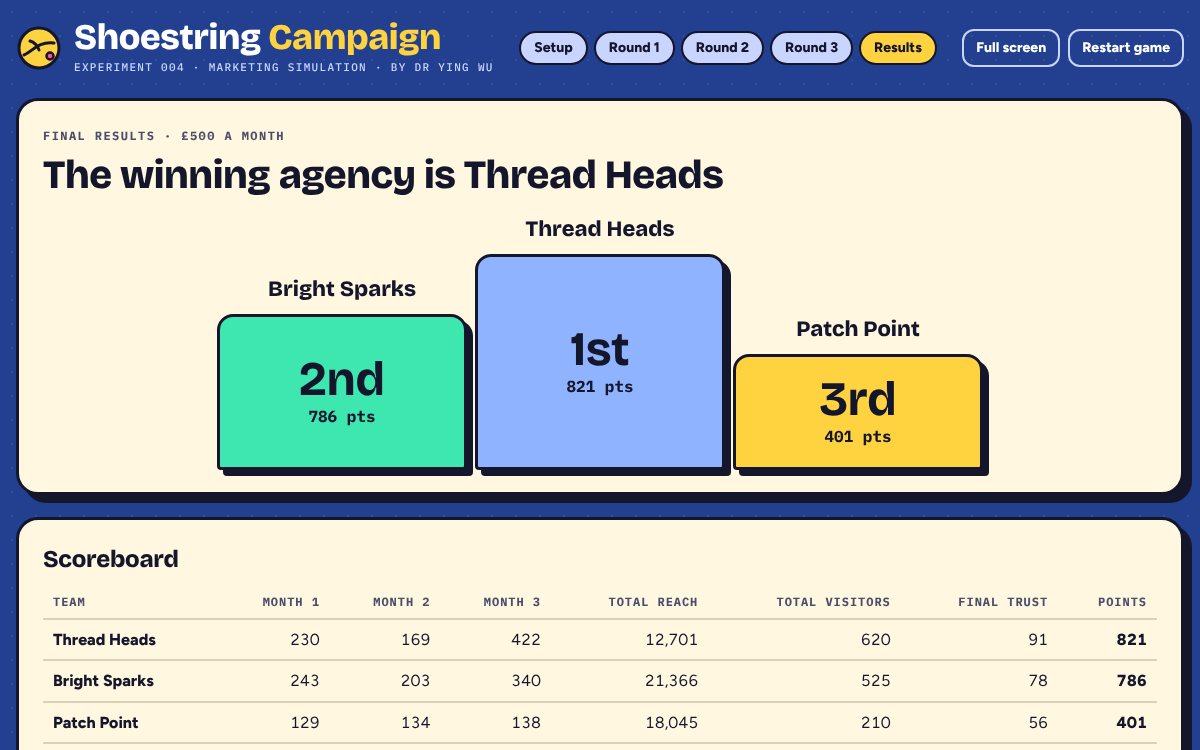
The podium, then the scoreboard and debrief.
Solo mode
For online classes, homework or revision. No projector and no timer.
How to set it
Post the link lab.yingwu.co.uk/shoestring-campaign/#solo in your class stream or VLE. It opens straight into solo mode. No login, and nothing is collected.
What students do
Name their agency, pick a budget and play three months against three rival agencies: Boost & Hope, Front Page Co. and Steady Stitch. Their plans are fixed, so results are comparable across the class.
The reflection
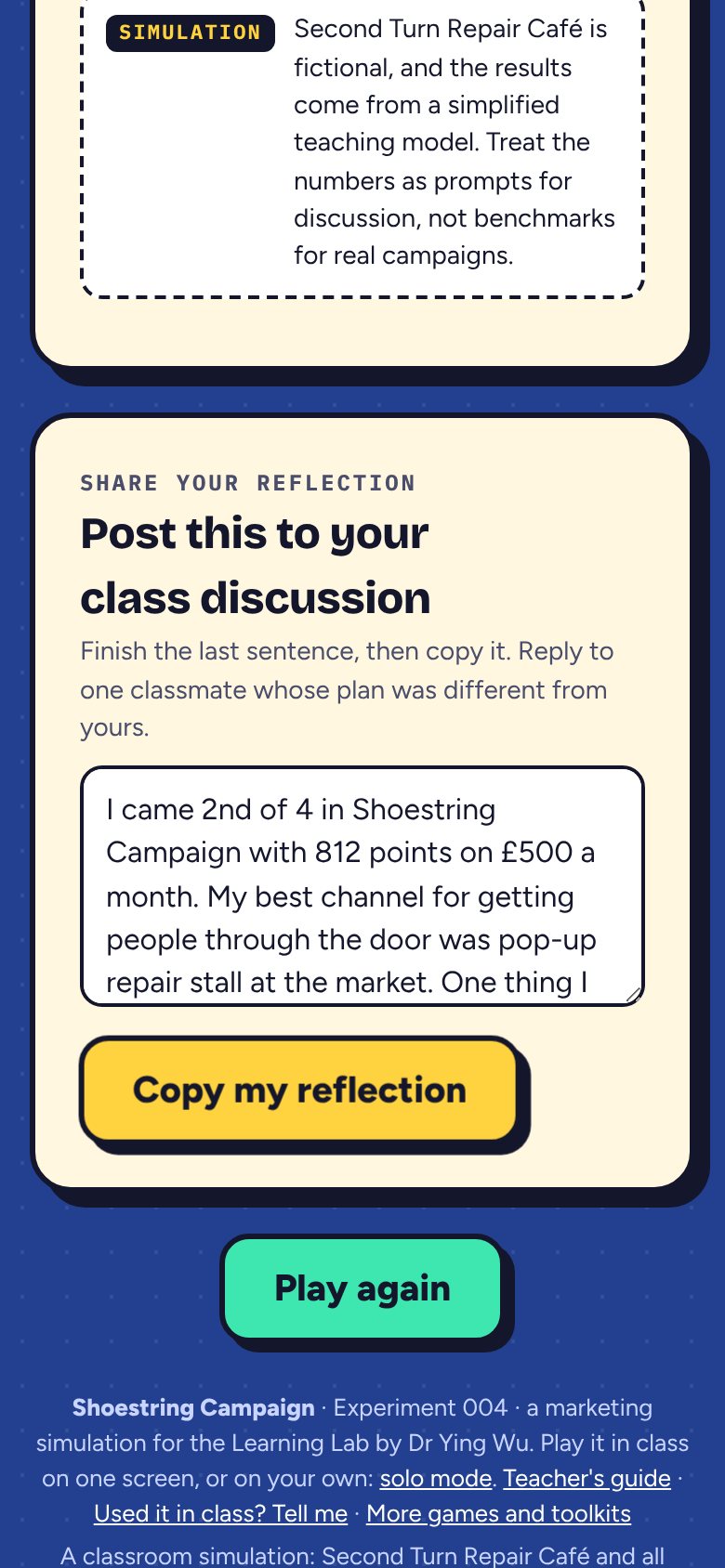
At the end, students get a ready-made reflection with their place, points and best channel. They finish the last sentence, copy it and post it.
Start a discussion
Ask each student to reply to one classmate whose plan was different. Steady Stitch scores 819 on £500 a month, a useful target to beat.
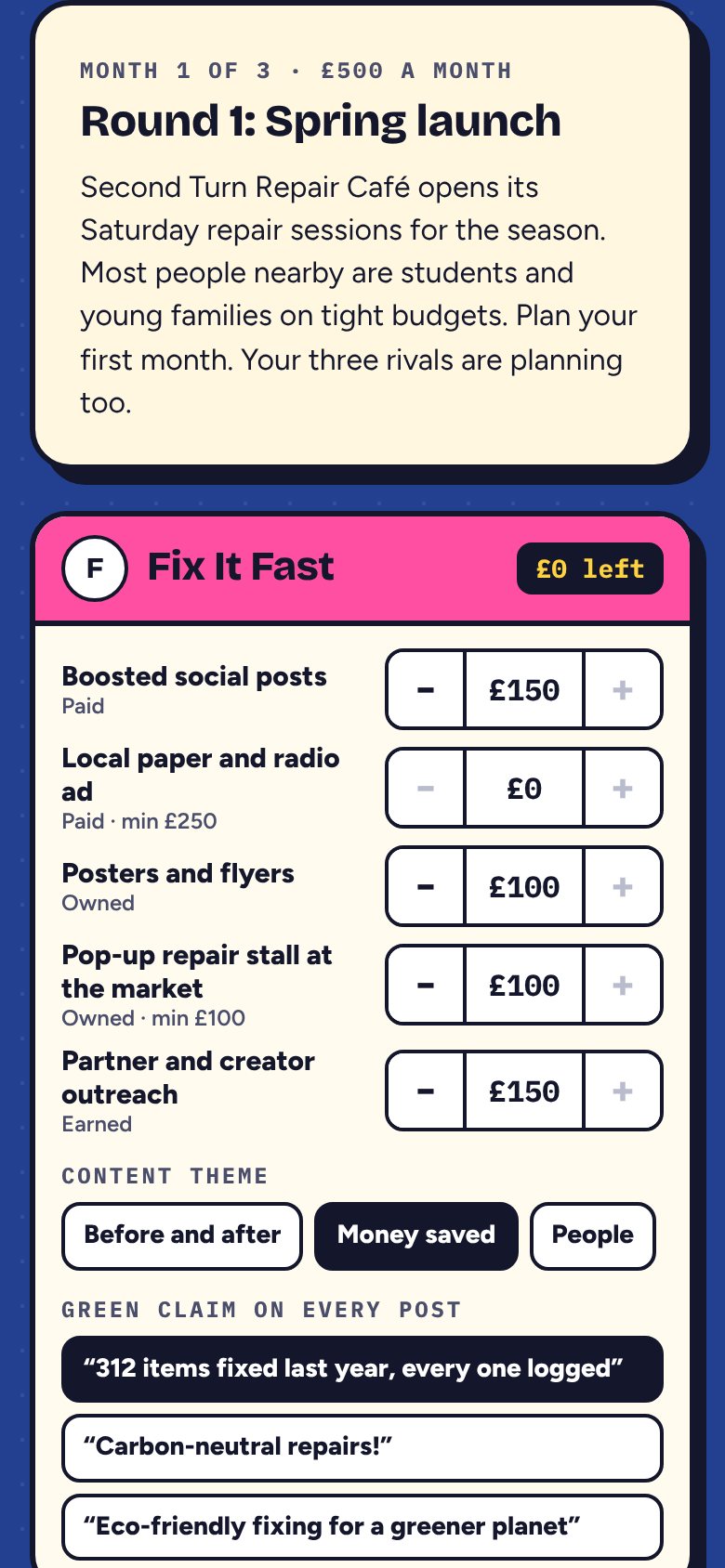
If something goes wrong
| Problem | What to do |
|---|---|
| A wrong amount was launched | The month is banked and cannot be undone. Say so and let that team adjust next month. Do not restart for one mistake. |
| The + button is grey | That team has spent its whole budget. Take money off another channel first. |
| An amount is pink | It is below that channel's minimum (£250 for the paper, £100 for the pop-up stall) and will buy nothing. |
| A team's trust fell sharply | Open its notes: heavy boosting, a vague claim or the carbon-neutral complaint. A good debrief moment. |
| The page reloaded | The game picks up where it was in that browser. To start again, click Restart game twice. |
| No Wi-Fi | If the page was already open, carry on. Otherwise use the worked answers table on paper. |
| Copy does not work in solo mode | The text is selected instead: students press Ctrl + C (Mac: Cmd + C). |
Cheat card: the button order
- In class, budget, teams, Start round 1
- Full screen, read the brief, Start timer (2:00)
- Enter each team's spend, theme and claim
- Read the plans back, Launch campaigns
- Read the twist and one note per team
- Plan month 2: change only what teams change, Launch
- Plan month 3: ask about green claims, Launch
- Final results and one debrief question
Behind the model
- Chaffey, D. and Smith, P.R. (2022) Digital marketing excellence: planning, optimizing and integrating online marketing. 6th edn. Abingdon: Routledge.
- Competition and Markets Authority (2021) Green claims code: making environmental claims. gov.uk
- Corcoran, S. (2009) 'Defining earned, owned and paid media', Forrester Blogs, 16 December. forrester.com
- Vakratsas, D., Feinberg, F.M., Bass, F.M. and Kalyanaram, G. (2004) 'The shape of advertising response functions revisited: a model of dynamic probabilistic thresholds', Marketing Science, 23(1), pp. 109-119.
- White, K., Habib, R. and Hardisty, D.J. (2019) 'How to SHIFT consumer behaviors to be more sustainable: a literature review and guiding framework', Journal of Marketing, 83(3), pp. 22-49.
- White, K., Hardisty, D.J. and Habib, R. (2019) 'The elusive green consumer', Harvard Business Review, 97(4), pp. 124-133.
A classroom simulation. The response curves, visit rates, trust effects and twists are teaching simplifications chosen to make the ideas above visible; they are not real campaign benchmarks. Second Turn Repair Café, the rival agencies and all events are fictional.