What students learn
1. Evaluate through four lenses
Usability, accessibility, speed, and trust and law. Most students only use the first; the game rewards the others and makes them visible.
2. Not everything unfamiliar is a problem
Four pins on every page are fine: white space, a menu icon, honest bad reviews, a secure-checkout strip. A false flag costs a point, so teams learn to separate preference from evidence.
3. Prioritise by impact
Each page has one critical problem. Choosing it as the fix-first earns a bonus, which opens a discussion about severity, reach, legal risk and effort.
4. Standards, not opinions
Every verdict names the standard behind it: Nielsen's heuristics, WCAG 2.2, Core Web Vitals, Stanford's credibility guidelines, UK consumer law and ICO cookie guidance. The final screen produces a model audit report students can reuse.
Built for digital marketing, e-commerce and UX classes, and a good partner to Rank Rescue (SEO). The shop, pages and figures are fictional; the problems were planted for teaching.
Five golden rules
- Reloading is safe.The game remembers where you are in this browser tab. Closing the tab clears it.
- There is no back button.Once you press Reveal, that page's flags are locked in. Read each team's numbers back first.
- Five flags maximum.Number buttons fade out once a team has five. The fix-first pin must be one of the team's flags; the star turns pink.
- Timers never start themselves.Press Start. The 2:30 clock is a guide; add 30 seconds if the room is still arguing productively.
- Try the 5-second test.Before teams start, press ⏱ 5-second test: the page shows for five seconds, then blurs. Ask "What does this shop sell? What would you tap first?"
The scoring model
Flag a critical problem +3 · major +2 · minor +1 · a fine pin −1
Fix-first bonus: +2 if your fix-first pin is the page's critical problem
Up to 5 flags per page · best possible score 13 a page, 39 in total
Ties go to the team that chose more critical problems to fix first
The best five flags are always the critical, the four majors, and no false flags. The minor problem is worth flagging only if a team is unsure about a major one. After each reveal the pins on the phone turn pink (critical), yellow (major), blue (minor) or green (fine), with coloured dots showing which teams flagged them.
Every pin, every page
Page 1: Home page (lenses: slow phone, contrast check)
| Pin | What it is | Verdict | Lens | Standard |
|---|---|---|---|---|
| 1 | Hamburger menu icon | Fine (−1) | Design | Nielsen 4: consistency and standards |
| 2 | Vague navigation: Explore, Discover, Inspire, Stories | Major (+2) | Usability | Nielsen 2: match the real world |
| 3 | Auto-rotating carousel, no pause | Major (+2) | Accessibility | WCAG 2.2.2 Pause, Stop, Hide (A) |
| 4 | Sign-up pop-up after 1 s, tiny × | Critical (+3) | Usability | Google: avoid intrusive interstitials; Stanford credibility 9 |
| 5 | Hero image 4.8 MB, LCP 6.1 s (evidence pack) | Major (+2) | Speed | Core Web Vitals: LCP good ≤ 2.5 s, poor > 4 s |
| 6 | Pale grey tagline (about 2:1) | Major (+2) | Accessibility | WCAG 1.4.3 Contrast (Minimum), AA: 4.5:1 |
| 7 | "Shop rain jackets" button | Fine (−1) | Usability | Nielsen 2 |
| 8 | White space between sections | Fine (−1) | Design | Nielsen 8: aesthetic and minimalist design |
| 9 | Trust strip: returns, stores, reviews | Fine (−1) | Trust | Stanford credibility 2 and 5 |
| 10 | Footer: © 2019, "Winter sale 2022" | Minor (+1) | Trust | Stanford credibility 8: keep content current |
Page 2: Product page (lenses: colour-blind view, screen reader, slow phone)
| Pin | What it is | Verdict | Lens | Standard |
|---|---|---|---|---|
| 1 | Seven share buttons above the product | Minor (+1) | Design | Nielsen 8 |
| 2 | One small photo, alt text "IMG_2231" | Major (+2) | Accessibility | WCAG 1.1.1 Non-text Content (A) |
| 3 | Clear price | Fine (−1) | Usability | Clear, upfront pricing |
| 4 | 4.6 stars including bad reviews | Fine (−1) | Trust | Spiegel Research Center (2017) |
| 5 | Colour-only swatches and stock | Major (+2) | Accessibility | WCAG 1.4.1 Use of Color (A) |
| 6 | No size guide | Major (+2) | Usability | Nielsen 10: help and documentation |
| 7 | Late "Pay in 3" banner pushes the page (CLS 0.31) | Major (+2) | Speed | Core Web Vitals: CLS good ≤ 0.1, poor > 0.25 |
| 8 | Tiny, unlabelled "Add to bag" icon | Critical (+3) | Accessibility | WCAG 4.1.2 Name, Role, Value (A); target size 2.5.8 / 2.5.5 |
| 9 | Delivery cost and free returns by the button | Fine (−1) | Trust | Trust at the point of decision |
| 10 | Description with headings and bullets | Fine (−1) | Usability | Nielsen 8 |
Page 3: Checkout (alert from marketing; lenses: price tracker, consent clicks, screen reader)
| Pin | What it is | Verdict | Lens | Standard |
|---|---|---|---|---|
| 1 | "Create an account to continue" | Major (+2) | Usability | Baymard: 19% abandon over forced accounts |
| 2 | Order summary with photo | Fine (−1) | Trust | Nielsen 6: recognition rather than recall |
| 3 | "Error" with no explanation | Major (+2) | Accessibility | WCAG 3.3.1 Error Identification (A); Nielsen 9 |
| 4 | Typing the address twice | Minor (+1) | Accessibility | WCAG 3.3.7 Redundant Entry (A) |
| 5 | Delivery dates, not just "3–5 days" | Fine (−1) | Usability | Nielsen 1: visibility of system status |
| 6 | Pre-ticked "Jacket Care Plan £7.99" | Major (+2) | Trust & law | Consumer Contracts Regulations 2013, reg. 40 |
| 7 | Surprise £2.50 mandatory service fee | Critical (+3) | Trust & law | DMCC Act 2024 drip pricing; CMA guidance; Baymard 39% |
| 8 | Secure checkout and payment logos | Fine (−1) | Trust | Trust at the point of payment |
| 9 | "Place order · £104.44" button | Fine (−1) | Usability | Nielsen 1 |
| 10 | Cookie banner with no "Reject all" | Major (+2) | Trust & law | ICO: reject must be as easy as accept |
Typical scores on page 1
| Team style | Flags · fix first | Score |
|---|---|---|
| Perfect audit | 2 3 4 5 6 · ★4 | 13 |
| Accessibility lens | 3 4 6 10 · ★4 | 10 |
| Eyes only (no speed or accessibility) | 2 4 7 9 10 · ★4 | 6 |
| Design critic | 1 2 4 8 10 · ★1 | 4 |
Design assumptions and simplifications
The same list appears in the game under "How this game simplifies reality".
- A planted, fictional site.Each page has exactly six problems and four red herrings. Real audits combine user testing, analytics and automated tools, and find problems nobody planted.
- Severity is a judgement.Critical, major and minor reflect the designer's view of impact on the task, how many people are affected and legal risk, in the spirit of common usability severity scales. Practitioners often disagree on exact ratings; that disagreement is a good discussion.
- Points are a teaching device.Real prioritisation also weighs the cost and effort of each fix.
- Speed figures are illustrative.They are presented as real-user (field) data at the 75th percentile, the way Google assesses Core Web Vitals. The thresholds are real; the shop's numbers are invented.
- The lenses are approximations.The colour-blind view simulates one common type (deuteranopia). The screen reader transcript is simplified; real screen readers such as VoiceOver and NVDA announce pages in their own ways.
- One page per round.Real evaluations follow whole journeys across devices and browsers.
- UK rules, simplified.Legal points describe UK rules in 2026 in plain language. They are not legal advice.
Step by step
About 15 minutes with one debrief question; allow 20 with all the lenses and the full debrief.
0 Set the scene and form teams
1.5 min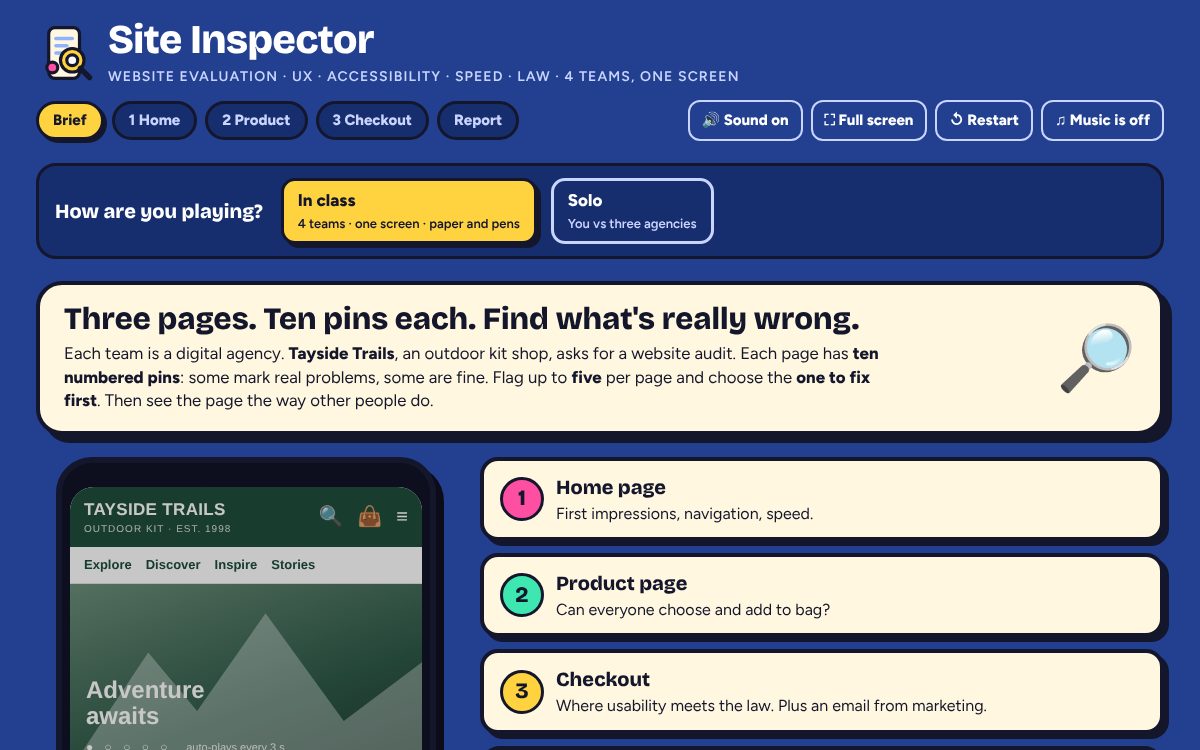
The brief: a phone mock of the shop, the four lenses and the points scale. - Say
- "You're four digital agencies pitching for an audit contract. The client says their site 'isn't converting'. Ten pins a page. Some are real problems, some are fine. You get five flags, and you must tell the client what to fix first."
- Students
- Four teams with paper and a pen. Encourage them to use their own phones to imagine the page in their hands.
1 Page 1: Home page
4 min · timer 2:30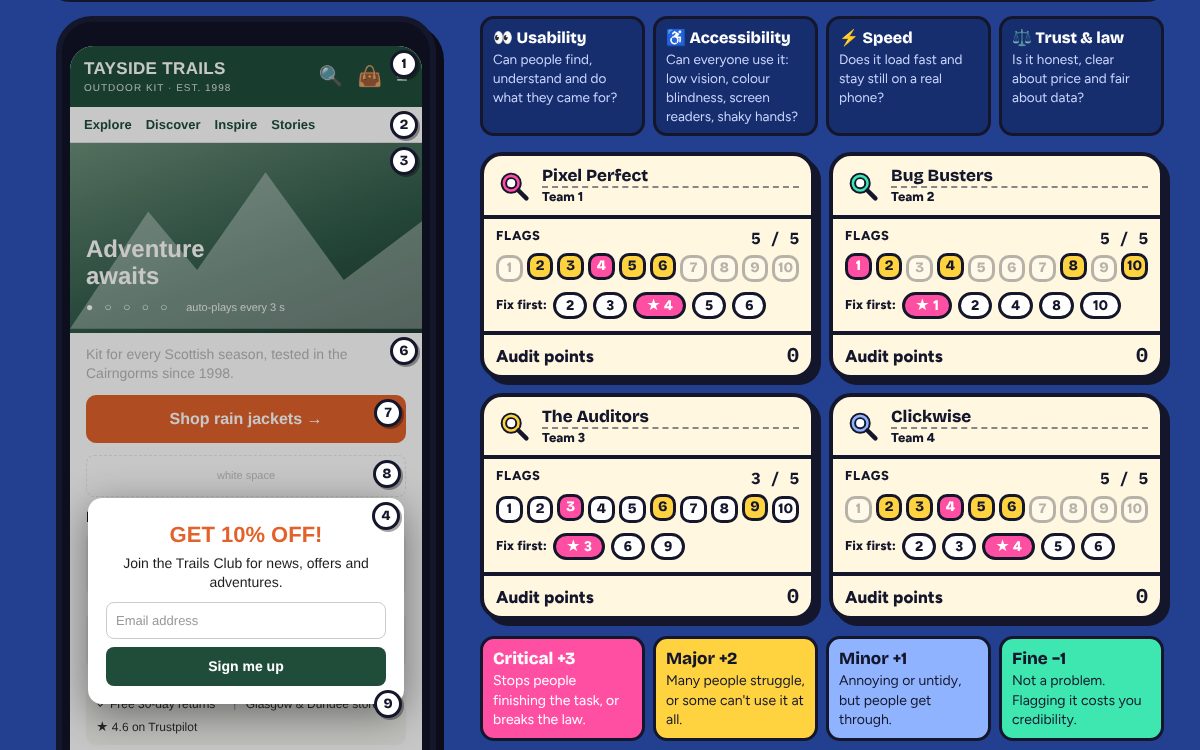
Teams write five numbers and circle their fix-first. Tap the numbers, then the fix-first. 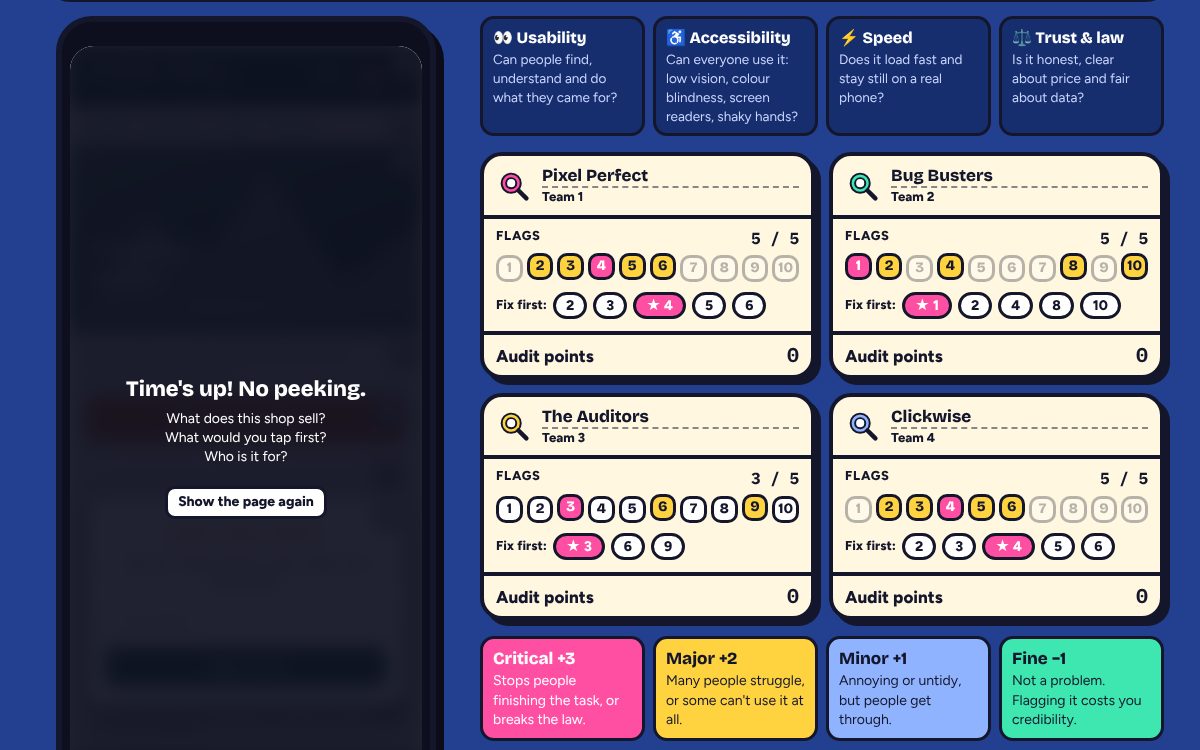
Optional warm-up: the 5-second test. - Click
- Optional: ⏱ 5-second test, ask the questions, then Show the page again.
- Start the timer. At 0:00 tap each team's five numbers, then its fix-first.
- Press Reveal the audit.
- Watch for
- Pin 5 sits on the evidence pack, not the phone. Teams who read the data spot the speed problem.
- White space (8) and the menu icon (1) attract false flags. That's the point.
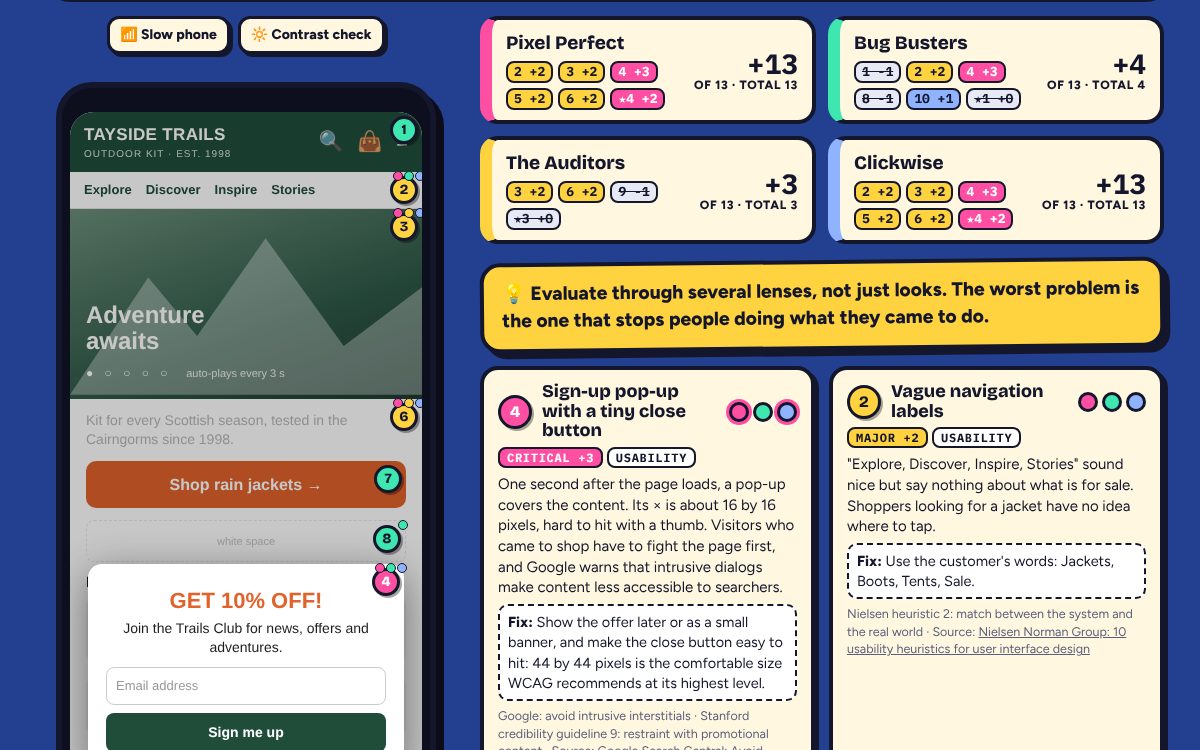
The reveal: pins change colour; press 📶 Slow phone to replay the 6.1-second load and the pop-up. 2 Page 2: Product page
4 min · timer 2:30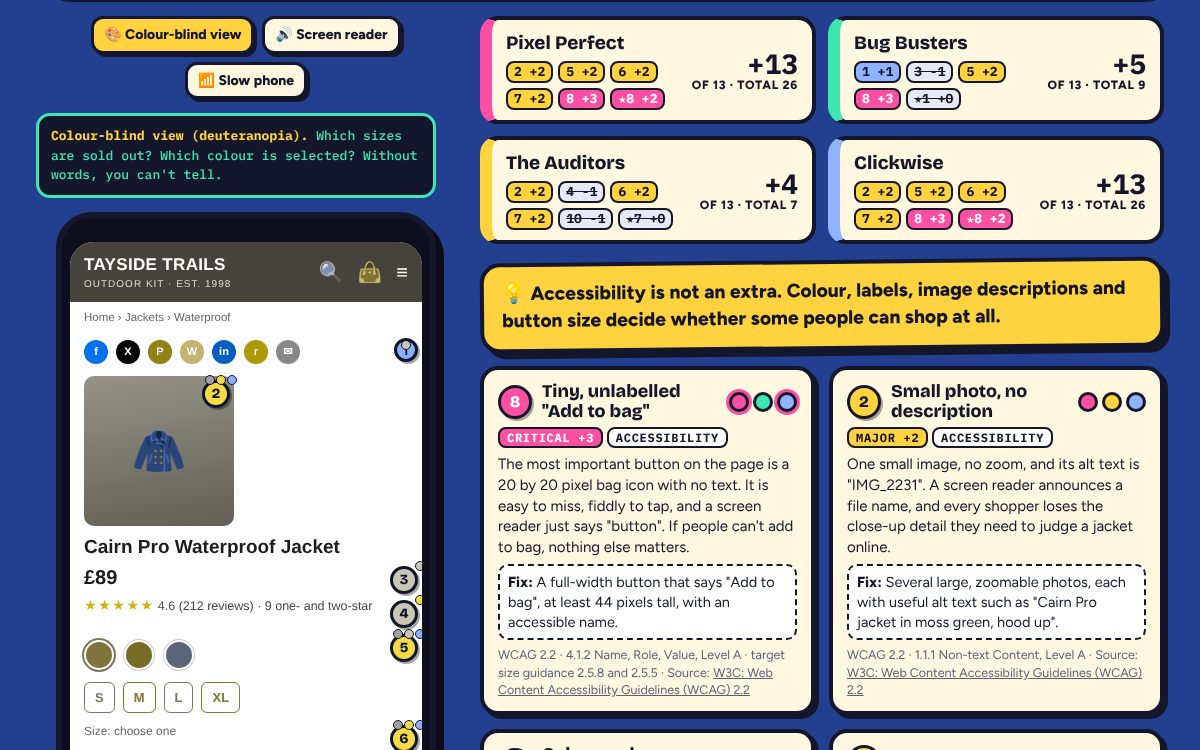
The colour-blind view makes pin 5 obvious. 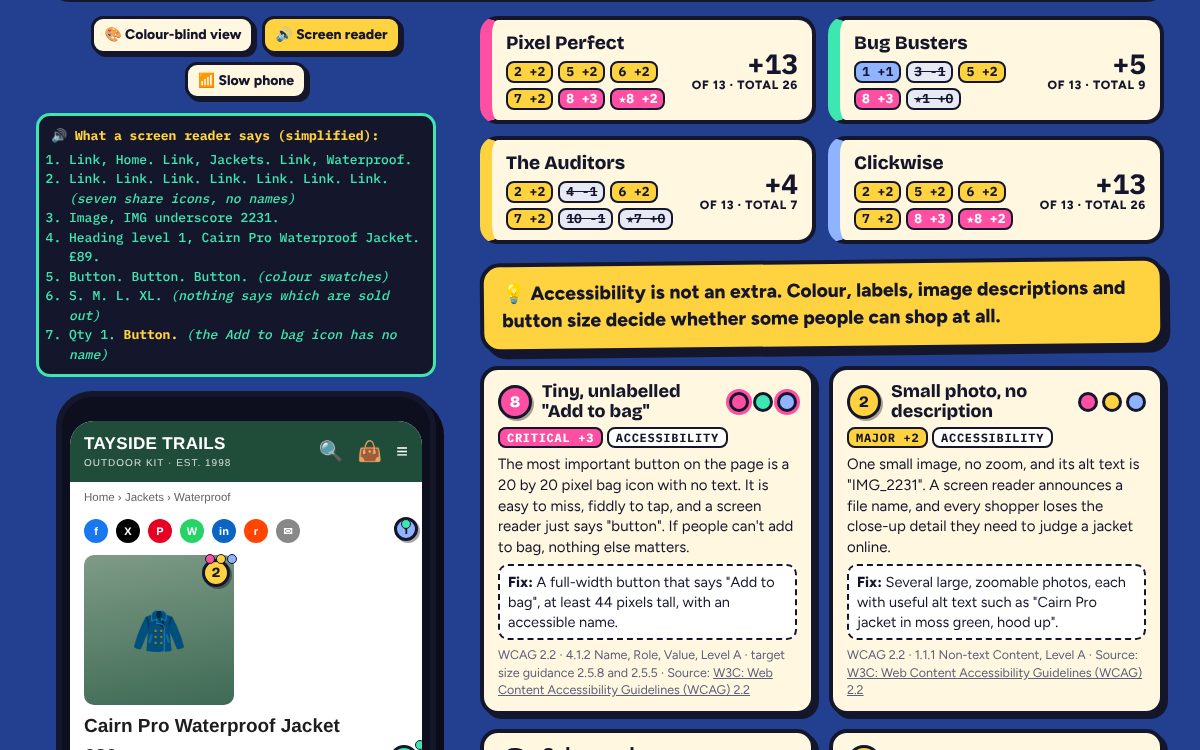
The screen reader lens: "Image, IMG underscore 2231… Button." - Say
- "Think about people who don't browse the way you do."
- Watch for
- Read the screen reader transcript aloud in a flat voice. It lands better than any slide on accessibility.
3 Page 3: Checkout, with an email from marketing
4 min · timer 2:30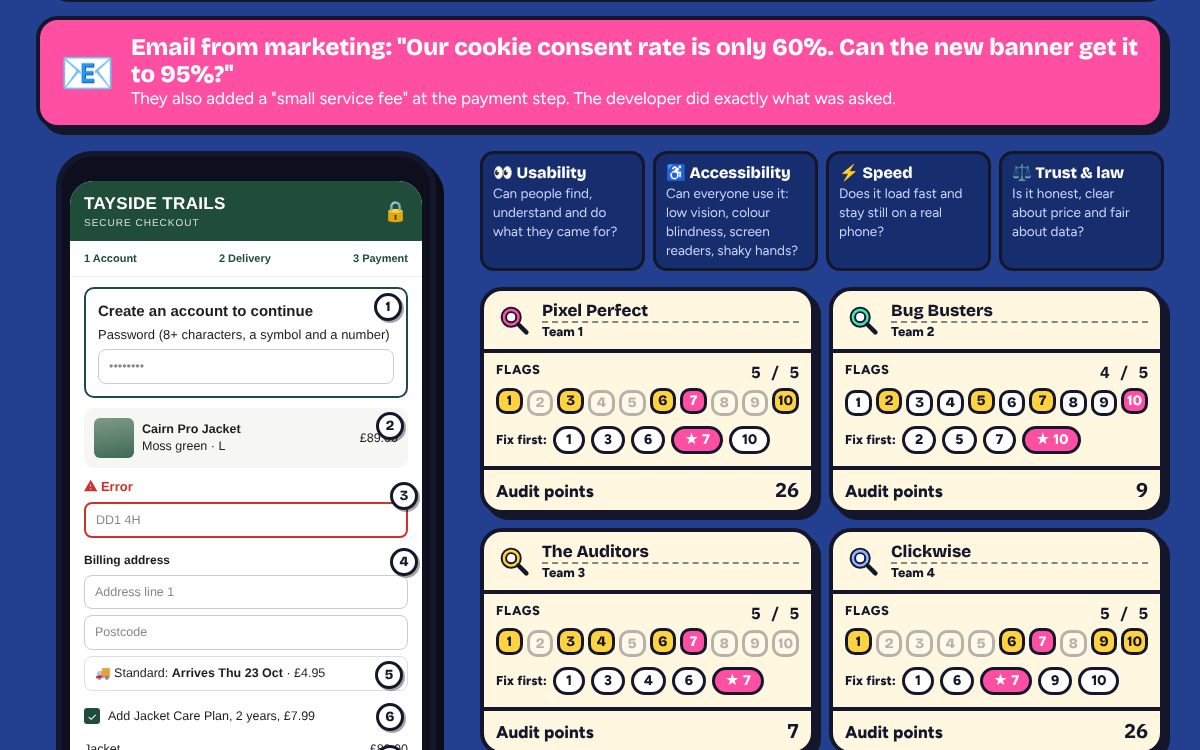
The alert sets up the two legal traps on this page. - Say
- "The developer did exactly what marketing asked. Is that a defence?"
- Watch for
- After the reveal, use 🧾 Price tracker (£89 becomes £104.44) and 🍪 Consent clicks (1 tap to accept, at least 4 to reject).
4 The final report and debrief
2 to 5 min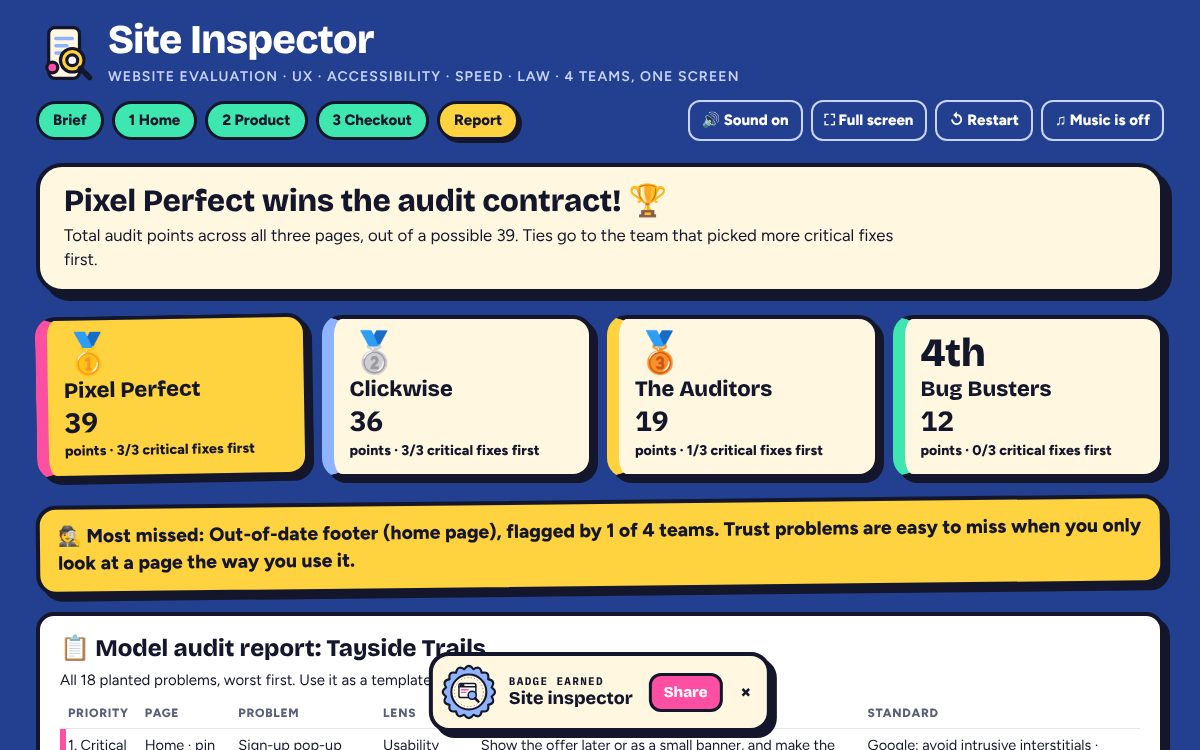
The winner, the problem most teams missed, and the model audit report. 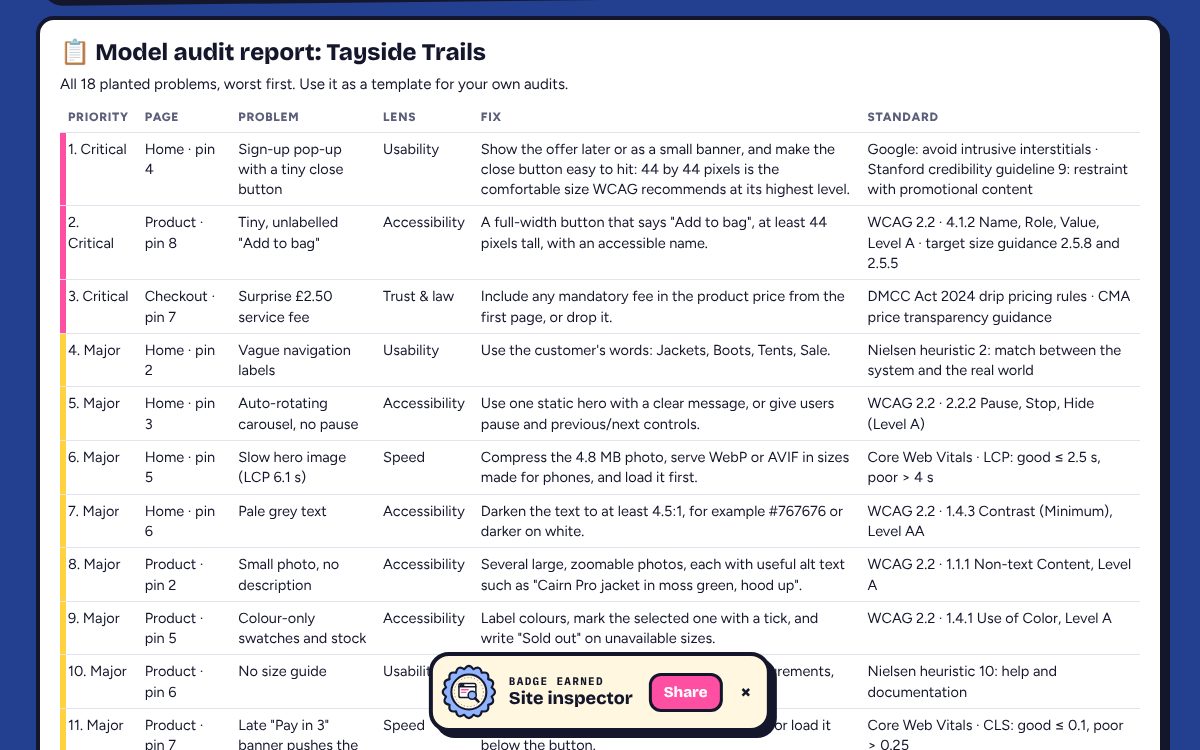
Copy the report or print it as a template for coursework audits.
Solo mode
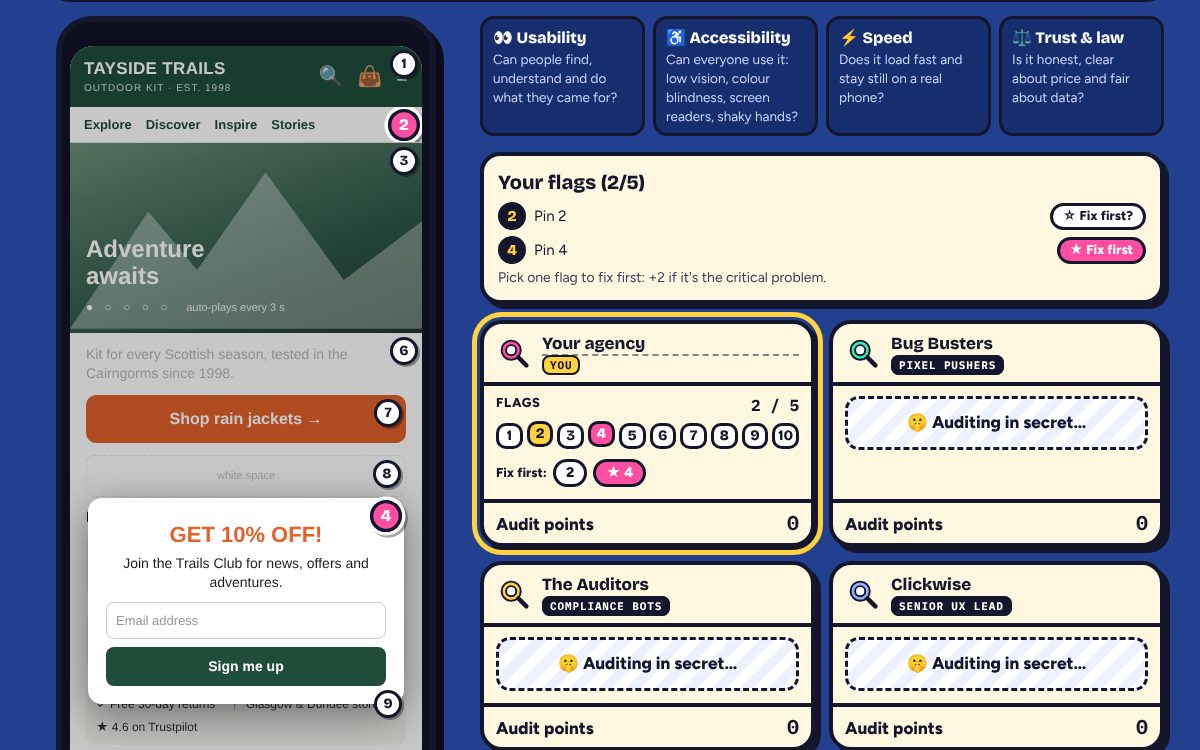
Share lab.yingwu.co.uk/site-inspector/#solo for homework or revision. The player audits against three rival agencies with blind spots: Pixel Pushers judge by looks and flag design choices, Compliance Bots hunt accessibility and legal problems but miss usability, and the Senior UX Lead is balanced but not perfect. Their flags have some randomness. Winning in solo mode earns the "Lead auditor" badge; finishing any game earns "Site inspector".
Debrief questions
- What did teams miss? Usually accessibility (colour-only information, alt text, unlabelled buttons) and speed (the evidence pack). We evaluate with our own eyes, devices and fast Wi-Fi, so we miss what we don't experience. Structured lenses and tools fix that.
- Preference or problem? A problem stops or slows people doing their task, excludes some people, or breaks a rule; a preference is a matter of taste. Evidence settles it: user testing, analytics, standards. White space, a menu icon and long-but-scannable descriptions are trade-offs, not errors.
- What goes first? Severity (does it block the task?), reach (how many people?), legal risk, and effort. The surprise fee is critical because it is unlawful and the top reason people abandon checkouts; the tiny "Add to bag" is critical because without it nothing else matters.
- Automated or human? Tools such as Lighthouse can flag low contrast, missing alt text, buttons without names, small targets and measure LCP and CLS. They can't judge whether alt text is useful, whether labels make sense, whether a fee is fair, whether a cookie banner is balanced, or whether a size guide is missing. You need both.
- Conversion vs compliance? Consent obtained through an unbalanced design is a legal risk, and the ICO has told major websites to make rejecting as easy as accepting. A lower, genuine consent rate is the real number to plan with; the trust you keep is worth more than the data you lose.
Cheat card: the button order
- Start round 1, Full screen, optional 5-second test, Start (2:30)
- Tap each team's five numbers, then its fix-first, Reveal the audit
- Try a lens, read the lesson; Next
- Page 2: Start, numbers, fix-first, Reveal; colour-blind and screen reader lenses
- Page 3: read the email alert; Start, numbers, fix-first, Reveal; price tracker
- See the final report; copy or print it; ask one debrief question
Behind the verdicts
- Baymard Institute (2026) How to reduce cart abandonment. baymard.com
- Competition and Markets Authority (2025, updated 2026) Price transparency (CMA209). gov.uk
- Fogg, B.J. (2002) Stanford guidelines for web credibility. Stanford Persuasive Technology Lab. credibility.stanford.edu
- Google Search Central (n.d.) Avoid intrusive interstitials and dialogs. developers.google.com
- MeasuringU (n.d.) Rating the severity of usability problems. measuringu.com
- Nielsen Norman Group (n.d.) 10 usability heuristics for user interface design. nngroup.com
- Spiegel Research Center (2017) How online reviews influence sales. Northwestern University. spiegel.medill.northwestern.edu
- The Consumer Contracts (Information, Cancellation and Additional Charges) Regulations 2013, regulation 40. legislation.gov.uk
- The Record (2023) UK data regulator tells websites to offer "Reject all" cookies option, 21 November. therecord.media
- W3C (2023) Web Content Accessibility Guidelines (WCAG) 2.2. w3.org
- web.dev (n.d.) How the Core Web Vitals metrics thresholds were defined. web.dev
A simplified classroom model: the severities and points are teaching devices. Tayside Trails is fictional, and its problems were planted.